Client Scripts
Client Scripts are small code snippets that are executed in the browser to extend or customize the standard functionality of EnigmaERP.
Build > Scripting > Client Script
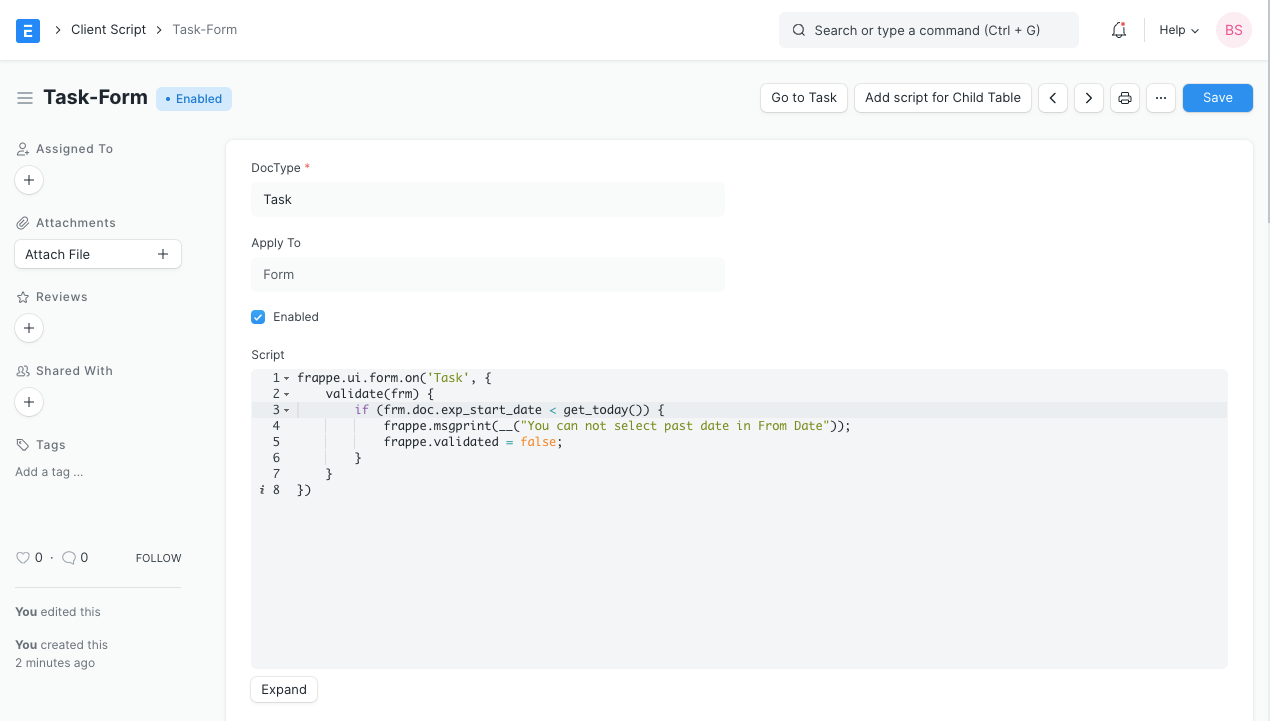
1. How to Create a Custom Script#
Create a Custom Script (you must have System Manager role for this):
- Go to Custom Script List and click on New.
- You will be redirected to a page wherein you will be asked to enter the DocType for which you wish to create a Custom Script.
- Type your Custom Script and make sure it is enabled.
- Save.
5. Notes#
- Server Custom Scripts are only available for the Administrator.
- Client Custom Scripts are in JavaScript and Server Custom Scripts are in Python.
- For testing, make sure to go to Tools > Clear Cache and refresh after updating a Custom Script.
Adapted for EnigmaERP from the ERPNext documentation,
© Frappe Technologies Pvt. Ltd. Content licensed under
CC-BY-SA 3.0.
EnigmaERP is a product of Enigma and is not
affiliated with or endorsed by Frappe Technologies Pvt. Ltd.